PVE 8 升級到 9 紀錄
- PVE 9 將只提供 cgroup-v2 不再提供相容舊版 cgroup , 如有 CT 如 CentOS 7 使用舊版 cgroup 可參考 安裝 Ubuntu + LXD 移轉 PVE 內的舊 CT
依照官方的 wiki 說明升級程序, 似乎不太困難, 因此將實際的升級程序操作紀錄在底下
升級程序
預先準備
- 將現在 PVE 8 所有主機都先升級到最新版本 Exp. 8.4.14 (有更新到 linux-kernel 需要重開機)
- 確定目前的 Cluster 是健康穩定狀態
- 驗證與測試所有 VM 與 CT 的備份都是正確 (萬一出現災難還有降災還原的機會)
- 確定是正確升級存儲庫的配置
- 根目錄至少要有 5GB 的磁碟空間, 建議有 10GB 的空間
- 請透過控制台或 SSH 執行操作;建議透過控制台執行,以避免 SSH 連線中斷。請勿在透過 GUI 提供的虛擬控制台連線時執行升級,因為升級過程中虛擬控制台連線會中斷。如果只有 SSH 可用,請考慮使用終端復用器(例如 tmux 或 screen),以避免 SSH 連線中斷時出現問題。
apt install tmux

# 啟動並命名會話
tmux new -s upgrade

# 列出所有會話
tmux ls

# 重新連接到會話
tmux attach -t upgrade

# 分離會話(保持背景執行)
按 Ctrl+b 然後按 d
執行升級
- 所有主機都升級到最新版本
apt update
apt dist-upgrade
pveversion
- 所有主機都執行升級檢測工具
pve8to9 --full- 如果之前有設定支援使用舊版 cgroup .. 會出現這個警告
FAIL: System explicitly configured for legacy hybrid cgroup hierarchy.
     NOTE: support for the hybrid cgroup hierarchy is removed in Proxmox VE 9!
要去移除之前的設定可參考 安裝 PVE 7 與移轉 PVE 6 VM/CT 執行紀錄
- 如果 PVE 系統開機是在 EFI 模式且 root 是 LVM 升級後就會無法開機, bootloader 檢測就會出現修正語法
echo 'grub-efi-amd64 grub2/force_efi_extra_removable boolean true' | debconf-set-selections -v -u然後重新安裝 GRUB 與移除 system-boot
apt install --reinstall grub-efi-amd64
apt remove systemd-boot
- 將所有 VM/CT 移到其他主機
- 更新 apt repo 設定
sed -i 's/bookworm/trixie/g' /etc/apt/sources.list - 新增 Proxmox VE 9 免訂閱軟體來源
cat > /etc/apt/sources.list.d/proxmox.sources << EOF
Types: deb
URIs: http://download.proxmox.com/debian/pve
Suites: trixie
Components: pve-no-subscription
Signed-By: /usr/share/keyrings/proxmox-archive-keyring.gpg
EOF
- 檢查 /etc/apt/sources.list, /etc/apt/sources.list.d/pve-install-repo.list 內容, 如果有先前的 Proxmox VE 相關軟體來源設定要移除
- 更改後先執行
apt update
apt policy
- 設定停用稽核訊息, 避免升級期間日誌過度膨脹
systemctl disable --now systemd-journald-audit.socket - 進行 Debian Trixie 與 PVE 9 更新
apt update
apt dist-upgrade
過程會出現以下幾個詢問
- Configuration file '/etc/issue' → N
- Configuration file '/etc/lvm/lvm.conf' → N
- Configuration file '/etc/default/grub' → Keep
- Configuration file '/etc/ssh/sshd_config' → N
- Configuration file '/etc/default/grub' → N
- Configuration file '/etc/systemd/journald.conf' → N
- Configuration file '/etc/postfix/master.cf.proto' → N
- Configuration file '/etc/chrony/chrony.conf' → Y
- Configuration file '/etc/snmp/snmpd.conf' → N
- 重新開機就會 PVE 9.x
萬一升級過程不小心斷線或 console 關閉
- ssh 再次連進去, 使用 tmux attach -t upgrade 進入繼續升級
Proxmox VE升級後
- 清空瀏覽器快取和/或強制重新載入 WebUI
- 清除舊有的套件
apt autoremove - 對於叢集
- 檢查所有節點是否都已啟動並運行在最新版本
- Proxmox VE 9 棄用了 HA groups,轉而使用 HA rules。如果在 PVE8 使用了 HA,在所有叢集節點升級到 Proxmox VE 9 後,HA groups 將自動遷移到 HA rules。
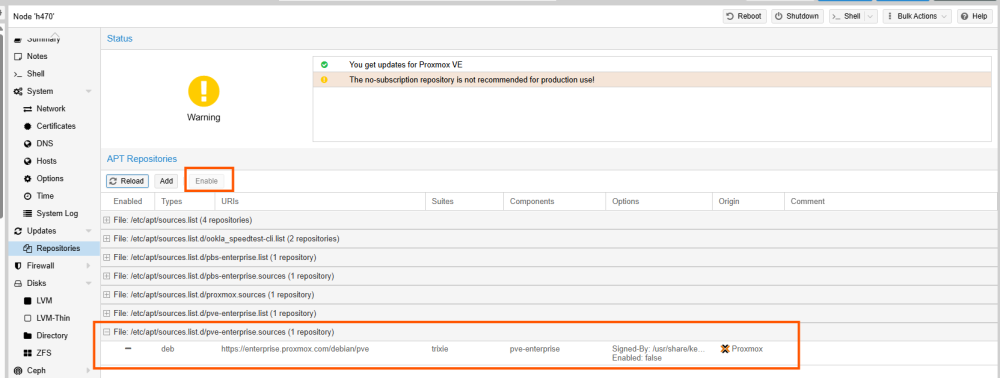
- 關於 Updates → Repositories
- 如果在 Node 上面執行
apt-get update出現異常, 應該是 pve-enterprise 是開啟狀態, 透過 Web Ui 可以將之關閉即可正常更新
- 對於 ZFS, 升級後 ZFS 版本也更新, 要針對每個 ZFS 進行手動升級 Exp. zpool upgrade local-zfs
root@nuc:~# zpool upgrade local-zfs
This system supports ZFS pool feature flags.

Enabled the following features on 'local-zfs':
  redaction_list_spill
  raidz_expansion
  fast_dedup
  longname
  large_microzap
