LXD Web UI 設定 OIDC 認證方式
- 因為 LXD Web UI 內建認證方式是採雙向 SSL 認證, 如果想透過反向代理 Exp. Nginx Proxy Manager(NPM) 原本雙向 SSL 認證就無法順利傳遞
- 增加設定 OIDC (Exp. Google oAuth 認證) 除了帳號管理就可以解決這問題
採用 Google oAuth 認證設定
1. 設定 Gooogle oAuth
-
- 選 Web application
- 定義這 oAith 的名稱 Exp. lxd-webui
- LXD Web 網址(NPM 設定的網址) Exp. https://lxd.my.ichiayi.com
- 認證後呼叫的網址 Exp. https://lxd.my.ichiayi.com/oidc/callback
- 將產生的 Client ID 與 Client secret 記錄下來 Exp. Client ID - 51xxxxxxxx-0p0rxxxxxxxxxxxxxxxxxxxx95hosvng.apps.googleusercontent.com / Client secret - GOxxxX-NbxxxxxxxPr_4xxxxxxxxxUSe_W

2. 設定 LXD OIDC
- 進到 LXD WebUI 進行設定
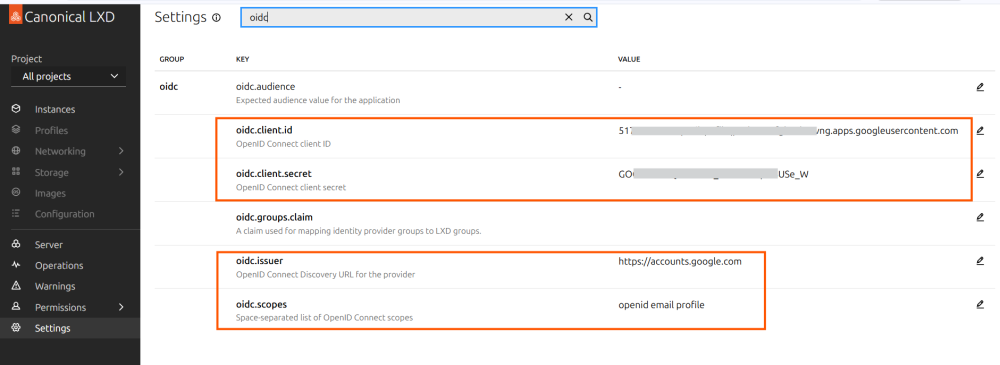
- oidc.audience 不用設定
- oidc.client.id 輸入 Google oAuth 取得的 Client ID Exp. 51xxxxxxxx-0p0rxxxxxxxxxxxxxxxxxxxx95hosvng.apps.googleusercontent.com
- oidc.client.secret 輸入 Google oAuth 取得的 Client secret Exp. GOxxxX-NbxxxxxxxPr_4xxxxxxxxxUSe_W
- oidc.groups.claim 不用設定 ← 之後針對每個登入 Google 帳號進行授權
- oidc.issuer 輸入 https://accounts.google.com
- oidc.scopes 輸入 openid email profile

3. 進入 NPM 設定的網址
- 點選 Login with SSO 就會彈出 Google 認證
- 第一次登入會發現沒有權限
- 進入 LXD Web 管理介面 Permissions → Identites 就可以看到剛剛 Google 登入的帳號 (AUTH METHOD : OIDC)
- 設定這個帳號的 GROUPS Exp. admins
- 重新 Login 就可以正常看到所有功能.
