這是本文件的舊版!
Docker Swarm (Docker 多主機方案)
- 因進入 Kubernetes 的學習門檻高, 以及需要較高規格的硬體資源議題, 因此快速安裝測試 Docker Swarm 方案.
安裝與部署
- 確保每一台已經安裝好 docker 環境且每台之間都可以透過 TCP port 2377 互相溝通
- 選定一台當主控點 Exp. 192.168.11.186
- 登入到 192.168.11.186
- 執行初始化指令
docker swarm init --advertise-addr 192.168.11.186 - 將回應的訊息記錄下來 Exp.
docker swarm join --token SWMTKN-1-49nj1cmql0jkz5s954yi3oex3nedyz0fb0xx14ie39trti4wxv-8vxv8rssmk7434l103e8k2d6x 192.168.11.186:2377
- 將三台 docker 環境加入成為 swarm 的 Worker Exp. 192.168.11.182, 192.168.11.237, 192.168.11.195
- 登入到 192.168.11.182, 192.168.11.237, 192.168.11.195
- 貼上並執行加入指令 (請使用您自己產生的 Token 和 IP)
docker swarm join --token SWMTKN-1-49nj1cmql0jkz5s954yi3oex3nedyz0fb0xx14ie39trti4wxv-8vxv8rssmk7434l103e8k2d6x 192.168.11.186:2377
- 回到主控點上 Exp. 192.168.11.186 查看狀態
docker node ls
使用 portainer 進行 Web 統一控管
- 在主控點安裝 Portainer (參考 在 Alpine 內安裝 Portainer 管理 Container)
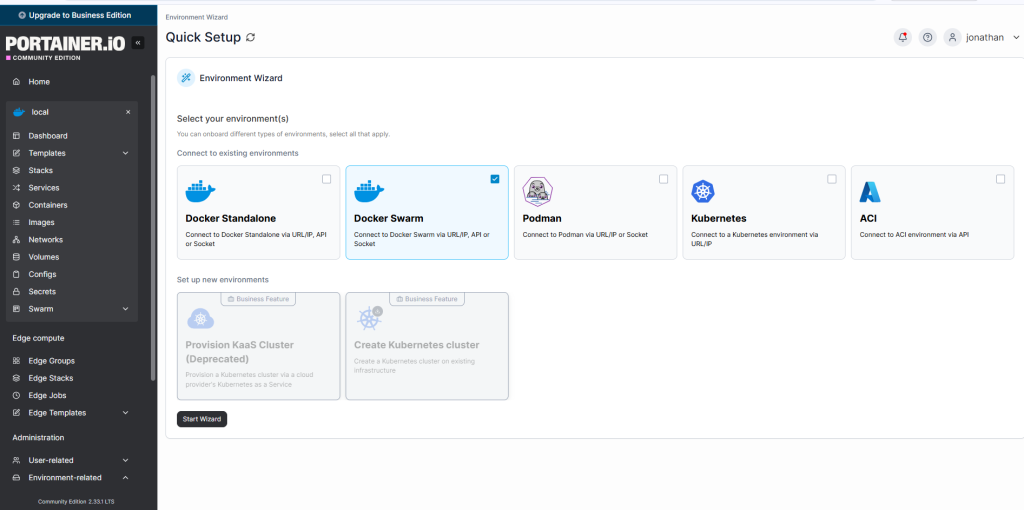
- 系統管理權限登入 Portainer UI → Home → Environment-related → Environments → Add environment
- 在主控點安裝 Agent (直接貼上這段即可)
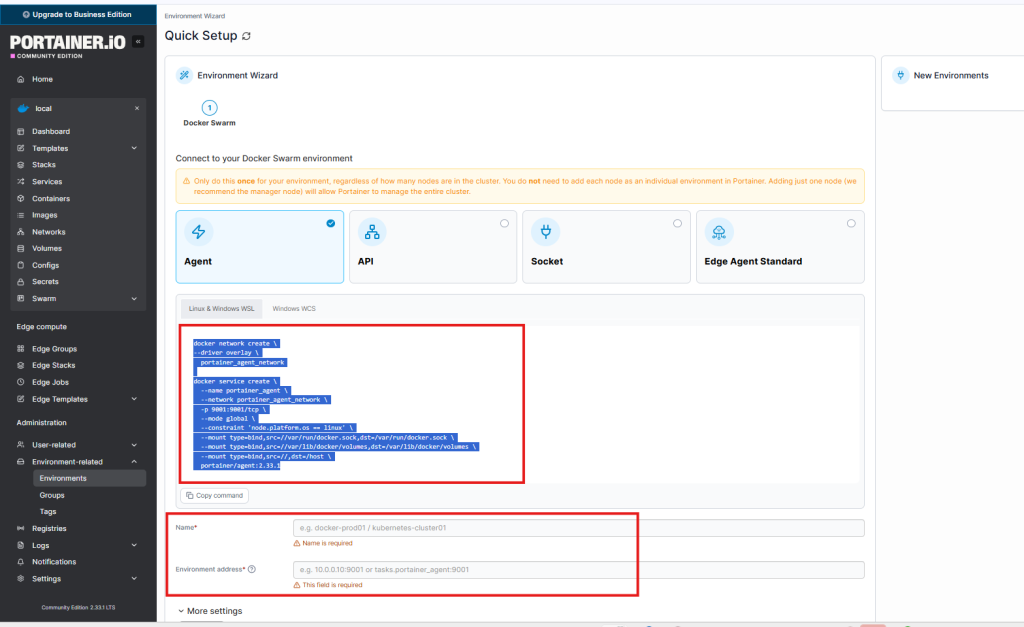
- 當 Agent 安裝成功後, 回到 WebUI 輸入主控點的 Name (Exp. Portainer-186) 與 address (Exp. 192.168.1.186:9001), 然後點下 Connect 按鈕就可以建立完成
- 回到 Home 在 Environments 清單就可以看到 Portainer-186 , 點下去就可以開始管理這個 Swarm cluster
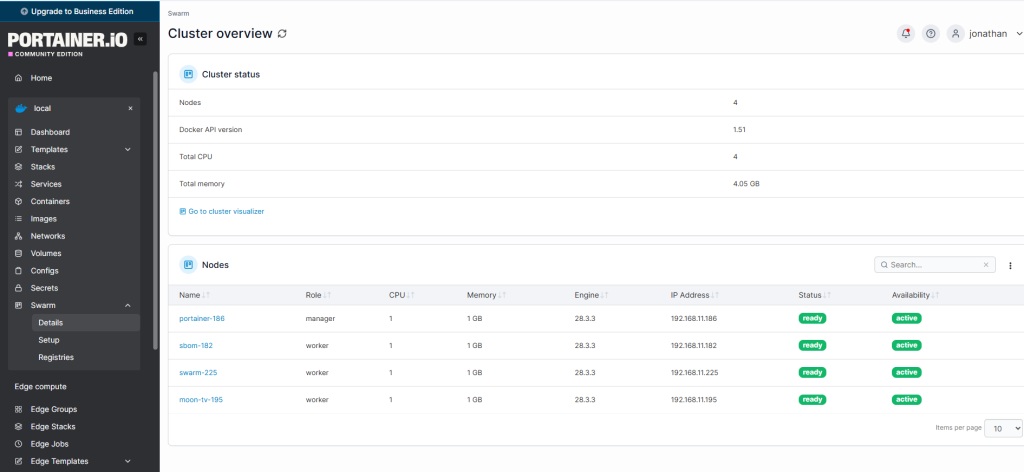


建立 watchtower 統一在主控點進行管理
- 希望可以透過 Discord 進行通知
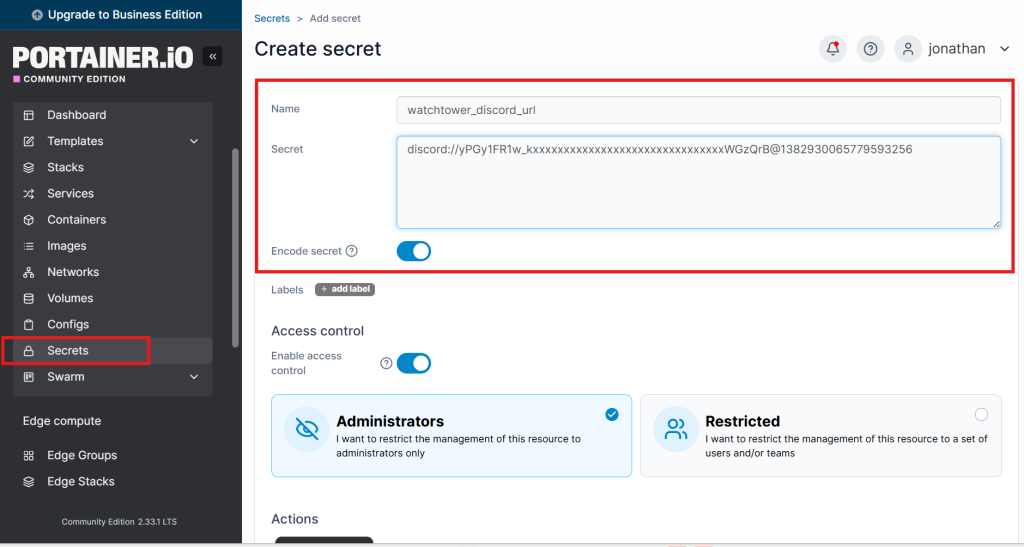
- 將 Discord 的 Webhook URL 以建立 Secrets 方式處理, 在主控點執行
echo 'discord://yPGy1FR1w_kxxxxxxxxxxxxxxxxxxxxxxxxxxxxxxxWGzQrB@1382930065779593256' | docker secret create watchtower_discord_url -或是在 Portainer Web UI 直接新增
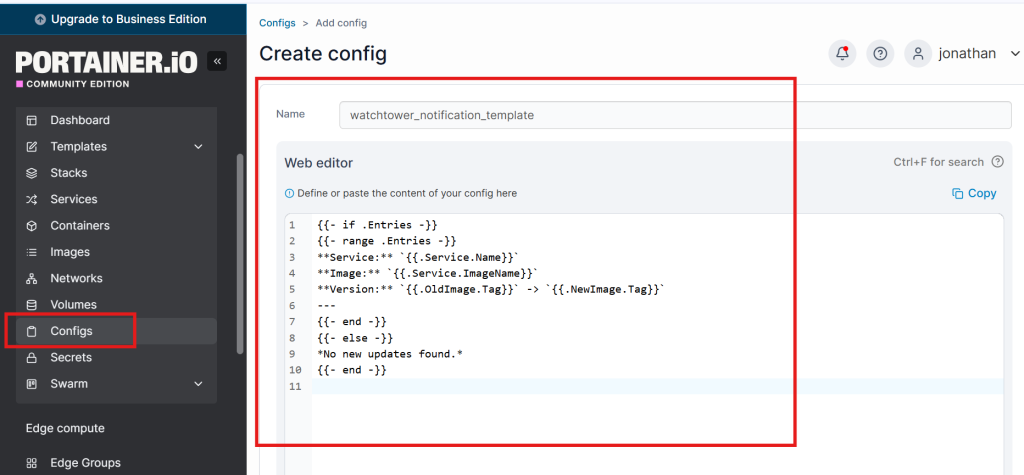
- 使用 Configs 來存放通知訊息的設定內容 template Exp. 🚀 Swarm Service Updated Service: portainer_portainer Image: portainer/portainer-ce Version: 2.19.4 → 2.19.5
vi watchtower_template.tpl{{- if .Entries -}} {{- range .Entries -}} **Service:** `{{.Service.Name}}` **Image:** `{{.Service.ImageName}}` **Version:** `{{.OldImage.Tag}}` -> `{{.NewImage.Tag}}` --- {{- end -}} {{- else -}} *No new updates found.* {{- end -}}在主控點執行
docker config create watchtower_notification_template watchtower_template.tpl或是在 Portainer Web UI 直接新增
- 建立 watchtower 的 Swarm Stack
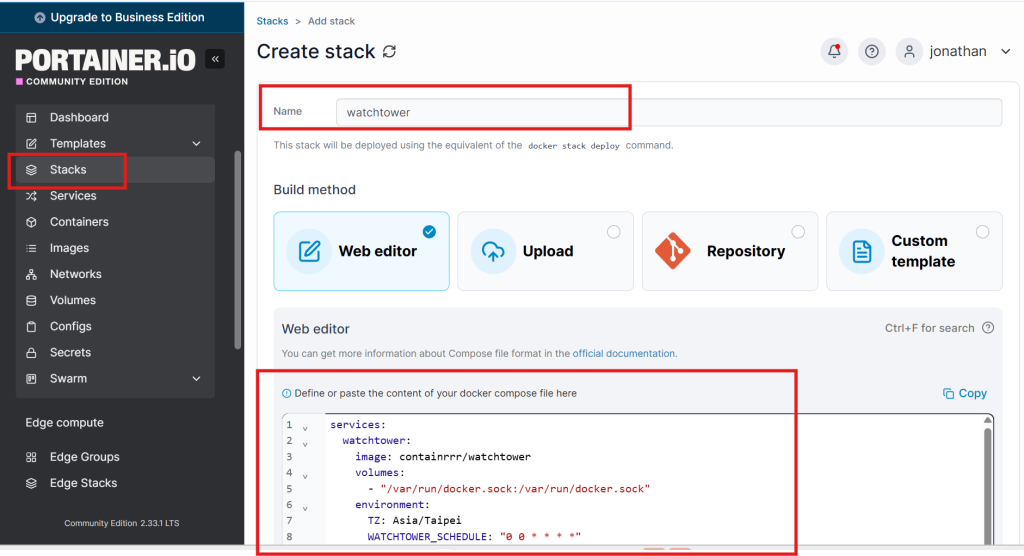
vi watchtower-stack.ymlservices: watchtower: image: containrrr/watchtower volumes: - "/var/run/docker.sock:/var/run/docker.sock" environment: TZ: Asia/Taipei WATCHTOWER_SCHEDULE: "0 0 * * * *" WATCHTOWER_CLEANUP: "true" WATCHTOWER_NOTIFICATIONS: shoutrrr WATCHTOWER_NOTIFICATION_URL_FILE: /run/secrets/watchtower_discord_url WATCHTOWER_NOTIFICATIONS_LEVEL: info WATCHTOWER_NOTIFICATION_TITLE: "🚀 Swarm Service Updated" WATCHTOWER_NOTIFICATION_TEMPLATE_FILE: /run/configs/watchtower_notification_template secrets: - watchtower_discord_url configs: - source: watchtower_notification_template target: /run/configs/watchtower_notification_template command: --scope swarm deploy: mode: global placement: constraints: - node.role == manager restart_policy: condition: on-failure secrets: watchtower_discord_url: external: true configs: watchtower_notification_template: external: true在主控點執行
docker stack deploy -c watchtower-stack.yml watchtower或是在 Portainer Web UI 直接新增


FAQ
1. 移除特定 Worker host 方式 Exp. immich-237
- 進入主控點主機執行
- 將 immich-237 設為 drain (暫停提供服務)
docker node update --availability drain immich-237 - 確認 immich-237 的 AVAILABILITY 已經由 Active → Drain , STATUS 已經由 Ready → Down
docker node ls - 移除 immich-237 這 Worker host
docker node rm immich-237
- 進入要移除的 Worker 執行 (immich-237)
- 執行離開 swarm 指令
docker swarm leave
2. 建立擴充至三台當主控點
- 將叢集中一台已經是工作節點 (Worker) 的主機,提升 (Promote) 為主控點。
- 確保您現有的 Swarm 叢集運作正常,主控點處於 Ready 狀態。
- 奇數原則:為了維持 Quorum 機制的穩定性,強烈建議主控點的總數為奇數(例如 3、5、7…)。如果您目前只有 1 台,那麼增加 2 台湊成 3 台是最好的做法。如果您目前已有 2 台,建議再增加 1 台湊成 3 台。
- 至現有的主控點執行
- 列出目前 Worker 清單
docker node lsportainer-186:~# docker node ls ID HOSTNAME STATUS AVAILABILITY MANAGER STATUS ENGINE VERSION ramtv89mfx2vcrekm7lsoobt8 moon-tv-195 Ready Active 28.3.3 318i734m5zx0w6iqe1q2ddijm * portainer-186 Ready Active Leader 28.3.3 i9zyahgszt2awip7dl1tckyz8 sbom-182 Ready Active 28.3.3 lxftp7j4emal33f81vmywtxaz swarm-225 Ready Active 28.3.3 q4fxgqgi2sp42wntxynks3wqf swarm-226 Ready Active 28.3.3
- 將 swarm-225 與 swarm-226 升級成主控點
docker node promote swarm-225
docker node promote swarm-226
- 確認升級結果
docker node lsportainer-186:~# docker node ls ID HOSTNAME STATUS AVAILABILITY MANAGER STATUS ENGINE VERSION ramtv89mfx2vcrekm7lsoobt8 moon-tv-195 Ready Active 28.3.3 318i734m5zx0w6iqe1q2ddijm * portainer-186 Ready Active Leader 28.3.3 i9zyahgszt2awip7dl1tckyz8 sbom-182 Ready Active 28.3.3 lxftp7j4emal33f81vmywtxaz swarm-225 Ready Active Reachable 28.3.3 q4fxgqgi2sp42wntxynks3wqf swarm-226 Ready Active Reachable 28.3.3