建立與設定 DockerHub Proxy
- 因為 DockerHub 設定每個 IP 抓取 image 的限制, 所以建立一個 DockerHub Proxy 可解決多台主機抓取相同 image 而不讓每台直接過去 DockerHub 抓取, 降低出現 Pull rate limit 的議題
registry:2 方案(適合小型服務情境)
- 檔案配置結構
.
├── cleanup.sh
├── config
│   └─── config.yml
├── data
├── .env
└─── docker-compose.yml
- 產生 REGISTRY_HTTP_SECRET
dockerhub-184:~# openssl rand -hex 16
005311c1d394ec958d6e1966bf43b4d3
- 建立 .env 環境變數設定
vi .envhttps://raw.githubusercontent.com/tryweb/docker-compose/refs/heads/main/docker-registry/env.example
# openssl rand -hex 16
REGISTRY_HTTP_SECRET=005311c1d394ec958d6e1966bf43b4d3
# 清理超過 7 天未訪問的資料
CLEANUP_DAYS_OLD=7
https://raw.githubusercontent.com/tryweb/docker-compose/refs/heads/main/docker-registry/env.example
- 建立 cleanup.sh
vi cleanup.shhttps://raw.githubusercontent.com/tryweb/docker-compose/refs/heads/main/docker-registry/cleanup.sh
#!/bin/sh

# Registry 清理腳本
# 此腳本會清理超過 7 天未訪問的資料

REGISTRY_DATA_DIR="/var/lib/registry"
LOG_FILE="/tmp/registry-cleanup.log"

# 從環境變數讀取清理天數,如果未設定,則預設為 7 天
DAYS_OLD=${CLEANUP_DAYS_OLD:-7}

# 創建日志函數
log() {
    echo "$(date '+%Y-%m-%d %H:%M:%S') - $1" | tee -a "$LOG_FILE"
}

log "開始執行 Registry 清理作業..."
log "清理天數設定為: $DAYS_OLD 天"

# 檢查 registry 資料目錄是否存在
if [ ! -d "$REGISTRY_DATA_DIR" ]; then
    log "錯誤: Registry 資料目錄不存在: $REGISTRY_DATA_DIR"
    exit 1
fi

# 計算清理前的磁碟使用量
BEFORE_SIZE=$(du -sh "$REGISTRY_DATA_DIR" | cut -f1)
log "清理前磁碟使用量: $BEFORE_SIZE"

# 清理超過指定天數未訪問的 blob 檔案
log "正在清理超過 $DAYS_OLD 天未訪問的檔案..."
DELETED_COUNT=$(find "$REGISTRY_DATA_DIR" -name "data" -type f -atime +$DAYS_OLD -print | wc -l)

if [ "$DELETED_COUNT" -gt 0 ]; then
    find "$REGISTRY_DATA_DIR" -name "data" -type f -atime +$DAYS_OLD -delete
    log "已刪除 $DELETED_COUNT 個過期的 blob 檔案"
else
    log "沒有找到需要清理的過期檔案"
fi

# 執行 registry 垃圾回收
log "執行 Registry 垃圾回收..."
if registry garbage-collect /etc/docker/registry/config.yml; then
    log "垃圾回收執行成功"
else
    log "警告: 垃圾回收執行失敗"
fi

# 計算清理後的磁碟使用量
AFTER_SIZE=$(du -sh "$REGISTRY_DATA_DIR" | cut -f1)
log "清理後磁碟使用量: $AFTER_SIZE"

# 清理空的目錄
log "清理空目錄..."
find "$REGISTRY_DATA_DIR" -type d -empty -delete 2>/dev/null || true

log "Registry 清理作業完成"
log "----------------------------------------"
https://raw.githubusercontent.com/tryweb/docker-compose/refs/heads/main/docker-registry/cleanup.sh
- 建立 config.yml
mkdir -p config
vi config/config.yml
https://raw.githubusercontent.com/tryweb/docker-compose/refs/heads/main/docker-registry/config/config.yml
version: 0.1 log: accesslog: disabled: false level: info formatter: text fields: service: registry_proxy storage: delete: enabled: true maintenance: uploadpurging: enabled: true age: 168h # 7天後清理未完成的上傳 interval: 24h # 每24小時檢查一次 dryrun: false cache: blobdescriptor: inmemory filesystem: rootdirectory: /var/lib/registry maxthreads: 100 http: addr: :5000 headers: X-Content-Type-Options: [nosniff] proxy: remoteurl: https://registry-1.docker.io # 如果需要認證到 Docker Hub,取消註解下面兩行 # username: your-dockerhub-username # password: your-dockerhub-password # 健康檢查配置 health: storagedriver: enabled: true interval: 10s threshold: 3 - 建立 image 存放路徑
mkdir -p data - 建立 docker-compose.yml
vi docker-compose.ymlhttps://raw.githubusercontent.com/tryweb/docker-compose/refs/heads/main/docker-registry/docker-compose.yml
services: registry_proxy: image: registry:2 container_name: registry_proxy ports: - "5000:5000" volumes: - ./config:/etc/docker/registry - ./data:/var/lib/registry environment: # 設定固定的 HTTP secret - REGISTRY_HTTP_SECRET=${REGISTRY_HTTP_SECRET} restart: unless-stopped healthcheck: test: ["CMD", "wget", "--quiet", "--tries=1", "--spider", "http://localhost:5000/v2/"] interval: 30s timeout: 10s retries: 3 start_period: 40s # 清理服務 - 定期執行垃圾回收 registry_cleaner: image: registry:2 container_name: registry_cleaner volumes: - ./config:/etc/docker/registry - ./data:/var/lib/registry - ./cleanup.sh:/cleanup.sh:ro environment: - CLEANUP_DAYS_OLD=${CLEANUP_DAYS_OLD} command: /bin/sh -c "while true; do sleep 86400; /cleanup.sh; done" depends_on: - registry_proxy restart: unless-stopped - 啟動服務與查看 log
docker compose up -d
docker compose logs -f
- 測試服務
curl -I http://localhost:5000/v2/- 應該可以看到類似以下的訊息
dockerhub-184:~# curl -I http://localhost:5000/v2/
HTTP/1.1 200 OK
Content-Length: 2
Content-Type: application/json; charset=utf-8
Docker-Distribution-Api-Version: registry/2.0
X-Content-Type-Options: nosniff
Date: Mon, 09 Jun 2025 09:43:05 GMT
- 其他測試服務命令
# 查看目前緩存的 repositories
curl -X GET http://localhost:5000/v2/_catalog

# 手動執行清理腳本
docker exec registry_cleaner /cleanup.sh
其他主機設定 /etc/docker/daemon.json
- Exp. registry:2 服務安裝在 192.168.11.184
- 編輯 /etc/docker/daemon.json
{ "registry-mirrors": [ "http://192.168.11.184:5000" ], "insecure-registries": [ "192.168.11.184:5000" ] } - 重啟 docker
service docker restart - 確認設定是否生效
docker info - 執行 docker pull 驗證
docker pull alpine - 如果成功 pull image, 可以回到 registry:2 服務主機 Exp. 192.168.11.184 查看 data/docker/registry/v2/repositories/ 內是否出現 alpine
Harbor 方案(適合大型服務情境)
- 先參考 harbor_docker 建立 Harbor 服務
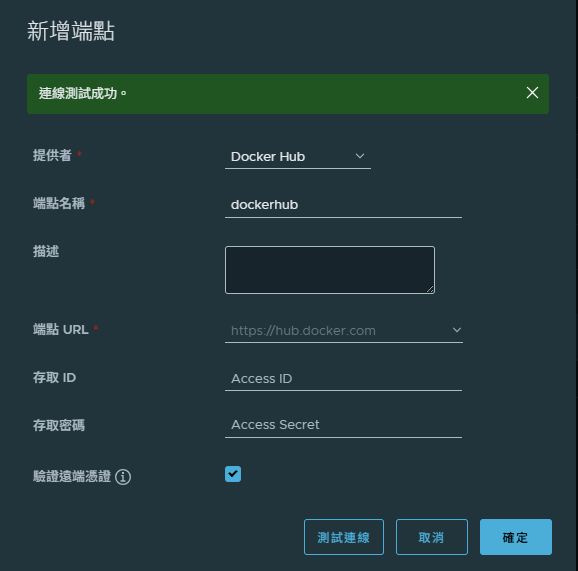
- 在 系統管理 → Registry管理 → 新增端點 Exp. dockerhub
- 提供者 : Docker Hub
- 端點名稱 : dockerhub
- 端點 URL : https://hub.docker.com (選 Docker Hub 會自動顯示這 URL)
- 點 測試連線 如果正常就可以 儲存