使用 github.io 部署靜態網頁
- 採用建立專案網站 (username.github.io/repository) 方式, 網址會是
https://<你的GitHub帳號>.github.io/<儲存庫名稱>
建立方式
- 建立新的 Repository:Exp. wbs-tool → https://github.com/tryweb/wbs-tool/
- 將靜態網頁檔案上傳到這個儲存庫。Exp. index.html → https://github.com/tryweb/wbs-tool/blob/main/index.html
- 啟用 GitHub Pages 服務:
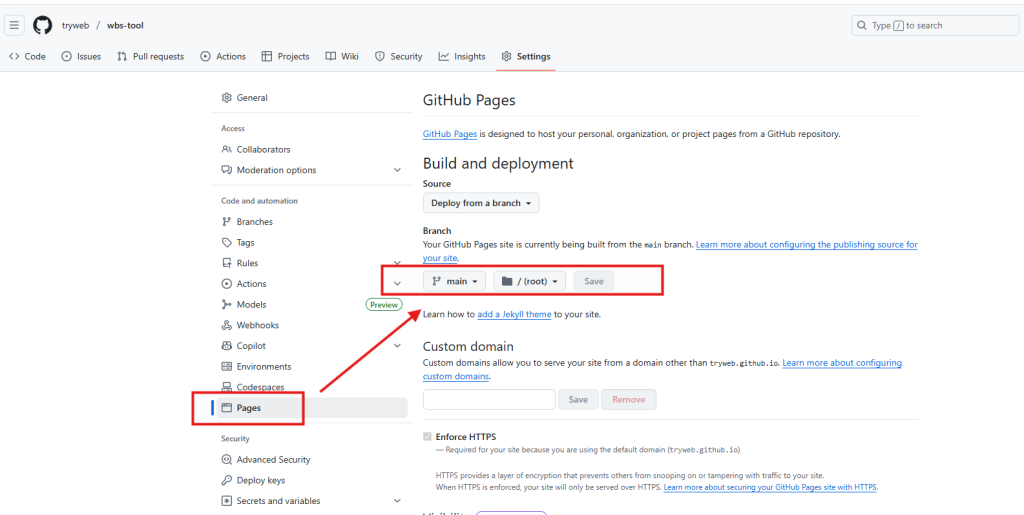
- 進入該儲存庫的 Settings (設定) → Pages (頁面) 區域
- 在 Source (來源) 或 Branch (分支) 的選項中,選擇你要用來發布網頁的分支 (通常是 main 或 master 分支)
- 確認發布的資料夾 (通常是 /root 或 /docs),然後點擊 Save (儲存)


參考網址
- gemini 2.5 Flash → prompt: 如何在 github.io 產生靜態網頁?